Article
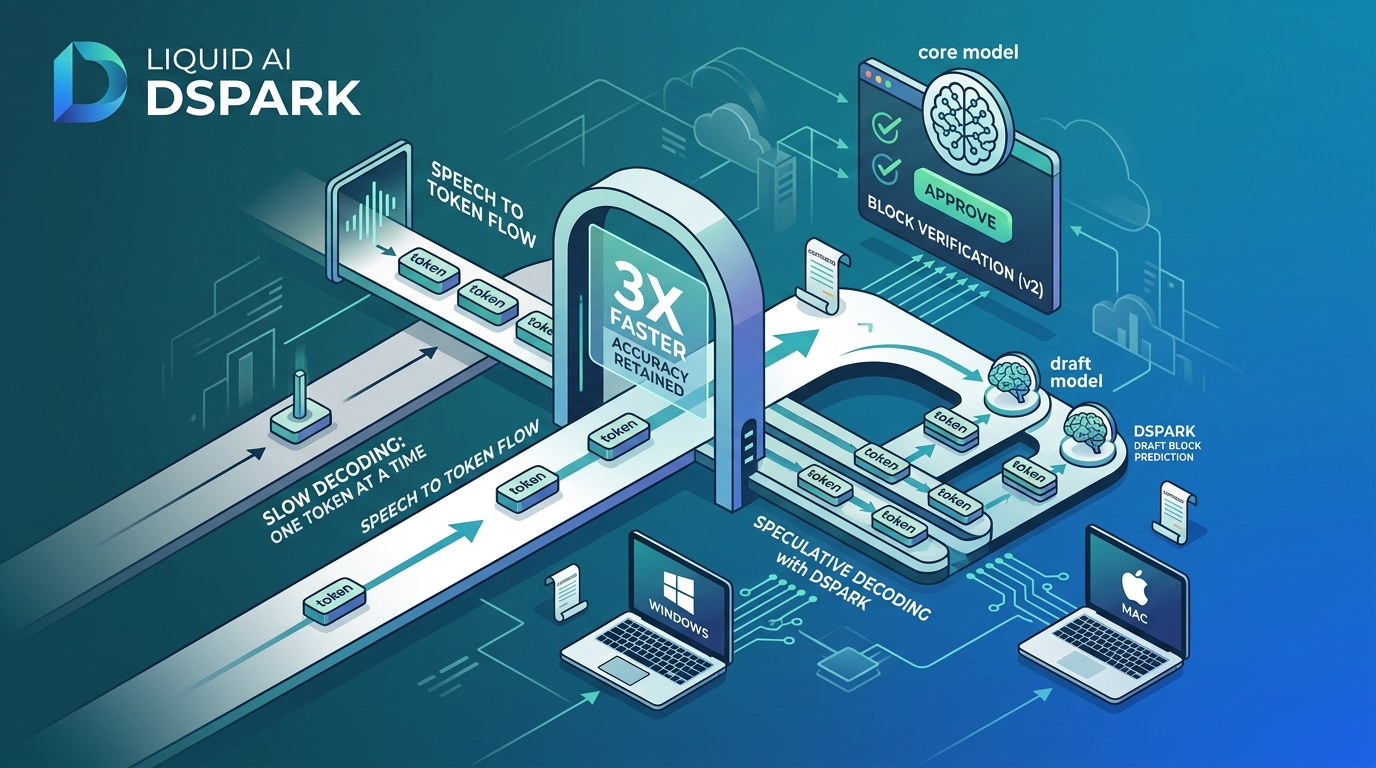
Liquid AI DSpark: Make Vision AI Models Run Up to 3x Faster
Liquid AI has introduced DSpark, a new companion model to their vision-language model LFM2.5-VL-3B. It’s built to accomplish one thing well: speed up AI replies without compromising any accuracy. In this Blog , we’ll show you exactly what it does, why it matters and how you can actually run it yourself – on both Windows and Mac.
What Is LFM2.5-VL-3B and DSpark?
LFM2.5-VL-3B is Liquid AI’s vision-language model, so it can interpret images and text combined and generate responses.
DSpark is a short, fast "draft model" (about 280 million parameters) that accompanies the larger model.
DSpark does not replace the primary model, it works with it and guesses ahead so the main model has less work to do per response.
The technique is known as speculative decoding.
How Speculative Decoding Works
The core AI model usually generates one word-piece (“token”) at a time – this is slow.
The smaller, faster DSpark model predicts a number of tokens ahead (“a block”) at once.
Then the main model checks those guesses all at once instead of creating them one at a time.
Correct guesses are accepted straight away. The core model rectifies wrong guesses.
The final output is always identical to the one the main model would have produced on its own — no loss in quality.
It’s like having an assistant write your email for you, and you simply scan and approve,” It explains. “You achieve the same outcome faster, since you’re checking instead of writing from scratch.
Real Performance Numbers
MacBook (M5 Max, MLX): 2.3x-3.13x decoding speedup; up to 2.62x whole response time speedup
Mac Studio (M3 Ultra, llama.cpp): 1.57x-2.14x decoding speedup; up to 1.77x end-to-end speedup
NVIDIA H100 GPU (SGLang): up to 2.66x decoding speedup; up to 2.27x end-to-end speedup
Extra memory cost: just ~8.9% extra parameters
Accuracy: same — outputs are mathematically guarantyd to be the same as the original model
The One Limitation to Know About
Speculative decoding does not speed up image processing, only text production.
A vision model has to run the image through a vision encoder first (“prefill”) before it can reply, and DSpark doesn’t touch this part.
That image processing step already swallows up a large portion of overall time on phones and computers, so the speedup you'll see in the real world is lower than the raw decode figures would imply.
This is a known tradeoff, sometimes explained by Amdahl's Law - your total speedup is limited by whatever part of the process you didn't speed increase.
Is This Only for Mac? (Windows Support Explained)
No. It is multi-platform. Here’s the breakdown:
Which Tool Works on Your System:
MLX-VLM — Mac only (Apple Silicon). Best for Apple M-series chips (M1, M2, M3, M4, M5).
llama.cpp — Works on Windows, Mac, and Linux. Best for CPUs or general GPUs — this is the most accessible option for most people.
SGLang — Works on Windows (via WSL/Linux) and Linux. Best for servers running NVIDIA GPUs.
If you're on Windows, llama.cpp is your easiest entry point.
How to Use It: Step-by-Step
Option 1: Windows or Linux, using llama.cpp
Step 1 — Get a llama.cpp build that supports DSpark.
You'll need a version that includes the DSpark speculative decoding patch (check the llama.cpp GitHub repo for the merged pull request supporting LFM2 DSpark).
Step 2 — Download the model files from Liquid AI's Hugging Face page (GGUF format), including:
The main model file
The vision projector file (mmproj)
The DSpark draft model file
Step 3 — Run the server with a command similar to this:
llama-server -m models/LFM2.5-VL-3B-F16.gguf ^

  --mmproj models/mmproj-LFM2.5-VL-3B-F16.gguf ^

  -md models/LFM2.5-2.6B-DSpark-F16.gguf ^

  --spec-type draft-dspark --spec-draft-n-max 8 --spec-draft-n-min 0 ^

  -fa on -ngl 99 -c 8192
(Note: on Windows, use ^ for line continuation in Command Prompt, or backslashes \ if using WSL/Git Bash/PowerShell with bash syntax.)
Step 4 — Send it a request — llama.cpp exposes a local server you can query with any HTTP client, or through its built-in web UI, just like normal.
mlx_vlm.server --model LiquidAI/LFM2.5-VL-3B --draft-model LiquidAI/LFM2.5-VL-3B-DSpark
This automatically loads both the main model and the draft model and handles the speculative decoding for you.
Option 3: GPU Servers, using SGLang
python -m sglang.launch_server \

  --model-path LiquidAI/LFM2.5-VL-3B \

  --speculative-algorithm DSPARK \

  --speculative-draft-model-path LiquidAI/LFM2.5-VL-3B-DSpark \

  --speculative-draft-attention-backend flashinfer \

  --speculative-dspark-block-size 9 \

  --disable-radix-cache
Once running, you can query it through a standard OpenAI-compatible API endpoint (http://localhost:30000/v1) — meaning you can plug it into existing tools that already support OpenAI-style APIs.
Why This Matters for the Future of AI
It nudges AI toward running locally on your own device, instead than always relying on the cloud.
Reduces cost for developers using AI at scale (less GPU-seconds per response)
Enhances privacy by processing data locally, reducing the need to send it to other servers
Illustrates a trend on the rise: rather than one huge model to accomplish it all, combine a large precise model with a small quick "helper" model
Key Takeaways
DSpark accelerates Liquid AI’s vision model without affecting its replies
Runs on Windows, Mac and Linux – not only Apple
Best speedups are from decoding, picture processing time is not changed.
Open-weight, free to download and try now